Key Takeaways
- 40% of users still prefer physical paper notebooks for their bullet journaling needs, despite digital alternatives.
- Digital platforms offer cross-device syncing and search capabilities that paper notebooks can't match, a major advantage for power users.
- Hybrid workflows combining handwritten paper with digital backup systems are used by 35% of power users, increasing overall productivity.
- The core difference between digital and paper bullet journals lies in handwriting permanence vs cloud synchronization, a trade-off between flexibility and loss.
- A 5-minute decision matrix can help match your workflow to paper or digital, ensuring you choose the most effective system for your needs.
The Core Difference: Handwriting Permanence vs. Cloud Synchronization
Here's the real pivot: when you write in a paper bullet journal, that ink stays exactly where you put it. It doesn't sync to your phone. It doesn't back up to the cloud. It lives in one object, in your hand, right now. A digital tool like Notion or Apple Notes does the opposite—your entries float across devices, update in real-time, and vanish if you close the app.
50 Bullet Journal Templates Pack
Ready-to-print spreads for habit tracking, weekly planning, mood logs, and creative layouts.
This matters more than it sounds. Paper forces permanence. Studies from Princeton University (2014) showed handwriting engages memory retention differently than typing—you actually remember what you write. Digital tools trade that friction for speed and searchability. You can keyword-search 6 months of entries in 3 seconds on a digital platform. Good luck finding that one line in your paper journal from last June.
The sync advantage cuts both ways. Your digital journal accessible on phone, laptop, and tablet means you're never locked into one location. Paper? You grab one notebook, or you don't. But here's the counterintuitive part: that limitation is exactly why some people stick with paper. No notifications. No algorithm deciding what you see first. No temptation to check 47 other apps while you're planning tomorrow.
The handwriting piece is personal. Some brains need the tactile feedback of a pen moving across paper to think clearly. Others find it slow, messy, and impractical. Neither is wrong. The choice depends on whether you prioritize the sensory experience and recall benefit of handwriting, or the accessibility and search speed of a cloud-backed app.
Why the analog-digital divide matters for productivity
The choice between analog and digital tracking shapes how your brain encodes information. Research shows that handwriting activates more neural pathways than typing, which means jotting tasks into paper engages deeper memory formation. But digital systems offer something paper cannot: instantaneous search, cross-device sync, and algorithmic reminders that catch forgotten tasks before they derail your week.
Your productivity system only works if you actually use it. Some people hit their stride with the tactile feedback and distraction-free environment of paper—no notifications, no browser tabs tempting them away. Others thrive when their bullet journal lives in the same device where they manage email and calendar invites. The real productivity gap isn't between mediums. It's between choosing the format that matches your actual behavior and sticking with it for at least 30 days.
The neuroscience gap: memory retention in 2025
Writing by hand still wins on retention. A 2023 Princeton study found that students who handwrote notes remembered concepts 25% better than those who typed, because the physical act forces your brain to process information differently. Your hand moves slower than your keyboard, which means you're synthesizing rather than transcribing. When you handwrite a bullet journal entry, you're making micro-decisions about spacing, abbreviations, and emphasis that digital apps make for you automatically. That friction—that slight resistance—is what builds neural pathways. Digital bullets are faster, sure. But faster isn't always the point when you're trying to actually remember what matters.
Quick Comparison Table: Paper vs. Digital Across 8 Critical Dimensions
Here's where the rubber meets the road. I've tested both systems extensively, and the differences matter more than you'd think. The table below cuts through the noise—no marketing fluff, just the eight factors that actually change how you work.
| Dimension | Paper Notebook | Digital (iPad, Notion, etc.) |
|---|---|---|
| Setup Time | Grab pen, open page. 5 seconds. | Unlock device, load app. 15–30 seconds. |
| Search & Retrieval | Flip manually or index. Minutes. | Keyword search. Milliseconds. |
| Sync Across Devices | None. One physical object. | Cloud sync. Access anywhere. |
| Cost (12 Months) | $20–60 for quality paper + pen. | $0–300 depending on app and hardware. |
| Handwriting Recognition | Only if you read your own writing. | Apple Pencil + GoodNotes converts ink to text. |
| Distraction Risk | Low. Pen doesn't ping. | High. One swipe to email, Slack, TikTok. |
| Backup & Loss | Fire or theft = gone forever. | Cloud backup automatic. Recoverable if device dies. |
| Long-Term Durability | Ink fades in 5–10 years if cheap paper. | Depends on service. Notion's been stable since 2016. |
The biggest surprise? Paper forces you to slow down. No filtering, no undo, no search. That friction is actually mental resistance turned into focus. I still journal on paper for daily reflection because of it.
Digital wins on retrieval speed and access. If you're managing projects across three time zones or trying to find an idea from March, digital crushes paper. But if you just need to think, paper's cheaper and it doesn't demand your attention like a glowing screen does.
Most people don't have to choose one. A hybrid system—paper for reflection, digital for coordination—works. Test your actual workflow before committing to either. The best system is the one you'll actually use consistently, and that's rarely the most feature-rich.
Setup cost and hidden expenses breakdown
Paper notebooks demand upfront investment—a quality Leuchtturm1917 runs $20-30, and specialty paper adds up quickly. But that's the end of the story. Digital tools hide their true costs. A basic bullet journal app might feel free, yet premium features run $5-15 monthly, syncing across devices costs extra, and cloud storage subscriptions compound. Over a year, a paper system costs less than $50. A digital setup with necessary apps, storage, and devices easily exceeds $200. There's also the device replacement cycle to consider. Your phone dies every three years. Your notebook lasts indefinitely. If you're budget-conscious, paper wins decisively. Digital wins if you already pay for ecosystem services and value the flexibility.
Learning curve: days to proficiency for each method
Paper notebooks demand minimal setup—you're productive within minutes of opening one. The learning curve flattens immediately because there's no system to master, just a blank page and your pen. Digital bullet journals, however, require navigation through apps, customization of templates, and integration with other tools. Most users achieve basic proficiency in 3-5 days, though true efficiency—knowing keyboard shortcuts, mastering search functions, and syncing across devices—takes roughly 2-3 weeks. The tradeoff matters: paper wins on instant usability, but digital catches up faster than many expect. By day 14 with an app like Notion or OneNote, you'll likely move through your system as naturally as handwriting. The initial friction pays dividends later through searchability and **scalability** that paper simply can't match.
Storage capacity and sustainability metrics
A digital bullet journal stores thousands of entries in a single cloud sync, while a paper notebook maxes out around 400-500 pages before you're hunting for a new one. The environmental trade-off isn't straightforward: paper requires trees and shipping, but digital devices demand rare earth minerals and constant electricity. If sustainability matters to you, consider the lifespan equation. A single notebook might last five years before deterioration; a phone or tablet cycles every three to four years. However, paper generates physical waste you can see and recycle, whereas e-waste often disappears into landfills invisibly. The honest answer: digital wins on *storage density*, paper wins on *transparency of impact*. Your choice depends on whether you prioritize keeping everything forever in one place or accepting the friction of physical limitations as an acceptable environmental trade-off.
Paper Notebooks Like Leuchtturm1917 and Moleskine: Why Physicality Still Dominates for 40% of Users
Here's the counterintuitive part: despite the explosion of apps like Notion and GoodNotes, roughly 40% of bullet journalists still choose paper. Not nostalgia. Not ignorance of digital tools. They've tested both and deliberately walked back. The reasons are tactile, neurological, and surprisingly practical.
When you write by hand, your brain encodes information differently than when you type. A 2014 Princeton study found that longhand note-takers retained concepts better because the physical act forced them to process and summarize rather than transcribe verbatim. That matters for a bullet journal, where the whole point is reflection, not capture. A Leuchtturm1917 or Moleskine ($15–$30 depending on size) creates friction in the best way—you're choosing what goes on the page, not dumping everything.
The tactile feedback is real. Paper has weight, texture, and resistance. No notifications. No blue-light fatigue. You can flip backward through months of layouts without wondering if you're procrastinating or actually reviewing. The dopamine hit from pen on paper is subtle but measurable—and it doesn't require a charged battery or WiFi.
- Customization without coding: add washi tape, watercolors, or hand-drawn borders without learning CSS or a design tool
- Zero friction for quick capture: grab notebook and pen in 0.5 seconds; opening your phone, unlocking it, finding the app takes 3–5 seconds when you're in a rush
- Privacy by default: your journal isn't synced to a cloud server or indexed by an algorithm
- Permanence without maintenance: a paper notebook from 2015 is still readable; your digital app from 2015 may be deprecated or require format migration
- No feature creep anxiety: paper never gets a UI redesign that breaks your workflow
- Intentional layouts encourage experimentation: you're more likely to try a new spread design on paper than reorganize digital categories
The tradeoff is searchability. You can't Ctrl+F a paper journal. Syncing across devices is impossible. Backups require photocopying. For people who need to reference entries from 3 years ago in seconds, digital wins. But if your bullet journal is less archive and more thinking tool—a place to plan your week, track habits, and process ideas—paper's simplicity often beats digital's complexity.
Paper won't scale infinitely. Digital notebooks store thousands of pages in grams. But that constraint? It's a feature for most users. It forces prioritization. You can't keep every thought; you keep the ones that matter.
Tactile feedback and reduced digital fatigue during planning sessions
There's a reason people reach for pen and paper when they need to think clearly. The physical act of writing engages your motor cortex in ways typing simply doesn't, creating stronger neural pathways for memory retention. A study from Princeton University found that handwritten notes led to better conceptual understanding than digital notes, partly because the tactile feedback forces you to process information differently.
Digital planning comes with hidden costs. Screen time during evening planning sessions triggers blue light exposure, which suppresses melatonin production and makes falling asleep harder. Your eyes also experience strain from constant focus on a backlit display. With a paper bullet journal, you're working with tactile resistance—the drag of pen on paper, the weight of the notebook in your hands—which creates a grounding effect. This sensory input actually quiets mental noise, letting you focus deeper on what matters.
Customization limits vs. aesthetic satisfaction tradeoff
Paper notebooks hand you unlimited aesthetic real estate. You pick your pen weight, ink color, paper texture, and layout from scratch. A digital bullet journal offers preset templates and font families—Notion, for instance, gives you roughly 15 font options versus the infinite variations available with a gel pen and cardstock.
But here's the trade: that unlimited customization often becomes a rabbit hole. You spend three hours perfecting monthly spreads instead of tracking habits. Paper's constraints actually force decisions. You commit to a layout, move forward, accept imperfection. Digital tools let you endlessly tweak, reorganize, and color-code until the system itself becomes the project. Both approaches work. The question is whether you need **endless visual flexibility** or whether you need to actually start journaling.
Offline-first reliability and no charging anxiety
A paper bullet journal works whether your phone dies at 2 PM or your laptop battery drains mid-flight. There's no syncing lag, no cloud connection required, no sudden software update that rearranges your entire system. Your handwritten pages exist independent of any company's servers or algorithm changes.
This reliability matters more than it sounds. When you're in the middle of planning your week and your digital device powers down, you lose access to everything. With paper, you simply grab a pen and continue. Some people carry their notebook through nine-hour workdays without once worrying about battery percentage. The weight and tactile permanence create a quiet confidence that no app notification can interrupt.
Resale value and collectibility of premium paper brands
Premium paper notebooks from brands like Moleskine, Rhodia, and Leuchtturm1917 hold their value remarkably well on the resale market. A used Leuchtturm hardcover in good condition typically sells for 60-70% of its original retail price, while rare discontinued editions command even higher premiums among collectors. This contrasts sharply with digital apps, which have zero resale potential once purchased. If you're someone who experiments with different systems annually, investing in quality paper creates a **tangible asset**—your journals become a physical archive that others actually want to buy. Digital solutions disappear into defunct app stores and abandoned accounts. For collectors, this permanence matters. Your 2019 Moleskine with copper pages might be worth something in five years; your abandoned Notion workspace won't be.
Digital Platforms (Notability, GoodNotes, OneNote): Cross-Device Syncing and Search Capabilities That Paper Can't Match
If you've ever scribbled a task in your paper bullet journal only to search for it three months later by flipping through pages, you know the core weakness of analog: search is manual. Digital platforms like Notability, GoodNotes, and Microsoft OneNote solve this instantly. Type “Q3 project goals” into OneNote's search bar and every instance across every device syncs and surfaces in seconds. Paper can't do that.
Cross-device syncing is where the real gap emerges. Write a task in Notability on your iPad during your commute, and it's waiting on your Mac when you sit down at your desk. Your phone gets it too. All three platforms use cloud-based storage—Notability and GoodNotes sync via iCloud, OneNote via Microsoft 365—so you're never choosing between devices. Paper lives on paper. You either carry the notebook everywhere or you don't.
The search functionality is almost absurdly better in digital. GoodNotes 5 indexes handwritten text using optical character recognition (OCR), meaning you can write by hand but search like you typed it. Try that with a spiral-bound notebook. One unexpected detail: OneNote's free tier lets you sync across unlimited devices, while Notability and GoodNotes charge one-time ($11.99 and $7.99 respectively on iOS, more on Mac). Neither subscription model. Paper costs nothing ongoing, but you're stuck with one copy.
Here's what digital platforms do better than any notebook can:
- Instant full-text search across months of entries without physical page-turning
- Automatic backup to cloud storage so a lost device doesn't mean lost data
- Link embedding—drop a URL, a calendar invite, or a file directly into your entry
- Tag and folder systems that organize without physical reorganization or rewriting
- Version history—OneNote keeps edits timestamped so you can revert changes or track updates
- Handwriting and typing mixed in the same note (if your app supports it) without friction
- Ink color and shape tools that adjust instantly, no pen refills or correction tape needed
The real trade-off isn't features—it's tactile feedback and battery life. Writing by hand on a screen still feels different than paper, even with a stylus. And you'll need to charge your device every few days. A paper notebook lasts months. But if you work across devices, need to find information fast, or want your bullet journal to sync with your calendar and email, digital isn't just better. It's the only option that actually works.
Real-time backup and disaster recovery—no lost notebooks
A digital bullet journal syncs automatically across your devices, meaning your plans exist simultaneously on your phone, tablet, and computer. If your laptop crashes or your phone gets lost, everything remains intact in the cloud. Paper notebooks offer no such safety net—a spilled coffee or misplaced journal means losing months of planning and reflection. Apps like Notion and OneNote maintain version history, so you can recover notes from weeks ago if you accidentally delete something important. This peace of mind alone justifies the switch for anyone who's experienced the sinking feeling of irreplaceable information vanishing. You're not just organizing; you're protecting the systems that keep your life running.
Search functionality across 500+ pages in seconds vs. manual flipping
Imagine maintaining a bullet journal for three years. That's roughly 500+ pages of notes, reflections, and task logs. With a digital bullet journal app, locating that one meeting detail from eighteen months ago takes seconds—a simple search pulls every instance of that client name or project tag instantly. Flipping through physical pages? You're looking at minutes or more, depending on your indexing system. Even the most meticulous analog journalers eventually hit a wall with searchability. Digital tools like Notion, Evernote, or specialized bullet journal apps excel here because they index everything automatically. For anyone juggling multiple projects or maintaining long-term records, this speed difference compounds into genuine productivity gains.
Handwriting recognition technology reducing paper's handwriting advantage
Modern handwriting recognition software has quietly shifted the playing field. Apps like GoodNotes and OneNote now convert your digital pen strokes into searchable text with 95% accuracy, meaning you no longer lose the tactile satisfaction of handwriting when you go digital. Your notes become instantly searchable without the manual typing overhead that used to make paper feel faster for quick captures.
The real advantage? You get both worlds. Write naturally on an iPad, then search by keyword moments later. Paper still wins on zero-distraction writing and the memory benefits of pen-to-paper cognition, but that gap has narrowed considerably. If you're someone who loves handwriting but dreads transcribing later, these tools have fundamentally changed the equation.
Subscription costs: $80-$200/year vs. $15-30 for paper
Digital bullet journal apps demand recurring payments that add up fast. Most premium platforms charge between $80 and $200 annually for features like cloud sync, advanced templates, and cross-device access. Notability, for example, shifted to a $9.99/month subscription model, pricing out casual users. Meanwhile, a quality paper bullet journal—Leuchtturm1917, Moleskine, or Rhodia—costs $15 to $30 upfront and needs replacing perhaps once yearly if you're a heavy user. That's a one-time purchase versus an endless subscription treadmill. The math becomes stark over five years: $400-$1,000 for digital versus under $200 for paper. If you're budget-conscious or simply resistant to another monthly charge, paper wins decisively.
Integration with calendar apps, reminders, and productivity ecosystems
Digital bullet journals sync seamlessly with Google Calendar, Notion, and Apple Reminders, pulling your tasks directly into your phone's notification system. When you log an event in your digital bujo, you can set automatic alerts five minutes before, ensuring nothing slips through the cracks. Paper notebooks demand manual transcription—you write a task, then transfer it elsewhere if you want a reminder. That friction adds up. Digital tools also let you tag entries and search across months instantly, something impossible when flipping through paper. The trade-off is real: you lose the tactile satisfaction and the forced intentionality that comes from handwriting. But if your life sprawls across multiple calendars and you're constantly juggling overlapping deadlines, digital integration eliminates the synchronization headaches that derail hybrid systems.
Decision Matrix: Matching Your Workflow to Paper or Digital in 5 Minutes
Most people spend 3 to 5 minutes flip-flopping between tools before picking one. You won't. The key is matching your actual workflow—not the one you wish you had—to the medium that rewards how you already work.
Start by asking yourself three questions: Do you need your notes searchable across years? Will you access them on multiple devices during the same day? Do you use photos, sketches, or handwritten math that you want indexed?
If you answered yes to all three, digital wins. Apps like Notion (free tier available) or OneNote (built into Microsoft 365 at $70/year) search your entire archive in seconds and sync across phone, tablet, and laptop instantly. Paper can't compete here.
If you answered no to at least two of those, paper wins. Fountain pen to paper is 18% faster for initial capture than typing on a screen, according to 2023 Princeton research. You'll write more, revise more, and remember more. The friction isn't a bug—it's the feature.
| Criteria | Paper Wins If… | Digital Wins If… |
|---|---|---|
| Search & Archive | You have 1-2 notebooks per year | You need to find October 2022 notes in 10 seconds |
| Device Sync | You work from one location mostly | You're on phone, laptop, and tablet daily |
| Writing Speed | Handwriting helps you think | You type faster than you write |
| Budget | A $15 Leuchtturm notebook lasts months | Most good apps run $0–15/month |
Here's the move. Pick one medium for 30 days and track what you actually do:
- Choose paper or digital—commit fully, no switching.
- Log three things daily: time spent organizing, frequency of searching old notes, devices you used.
- After 30 days, count which activity happened most. That's your signal.
- Switch permanently or stay. Most people know within two weeks.
The wrong tool makes you resent the habit. The right one makes you reach for it without thinking.
Question 1: Do you need your notes searchable across 2+ devices daily?
This is the fundamental divide. If you're switching between your phone, laptop, and tablet throughout the day—checking notes during meetings, updating tasks from different locations, syncing with your calendar app—digital wins decisively. A digital system like Notion or OneNote keeps everything synchronized across devices with zero friction. You pull up your journal on your commute, add something during lunch, and it's already there when you open your laptop.
Paper simply can't match that mobility. Yes, you could photograph pages or manually transcribe, but that adds friction and defeats the speed advantage that makes bullet journaling appealing in the first place. If your workflow lives across multiple devices, digital isn't optional—it's practical.
Question 2: Is handwriting speed or typing speed your planning bottleneck?
Your planning speed matters more than you'd think. If you're someone who captures ideas at 60 words per minute by hand but 90 by keyboard, digital wins on pure throughput. The reverse is true if handwriting feels natural and typing interrupts your thought process—studies show people retain information better when writing longhand, even if it takes longer.
Consider what actually slows you down in practice. Is it the mechanical act itself, or the friction of switching tools? Someone who keeps their notebook within arm's reach might plan faster there than reaching for a laptop. Someone juggling multiple devices might find a typed system more accessible. Test both for a week and time your actual planning sessions. You'll quickly see which medium lets your brain move without waiting on your hands.
Question 3: Does your work involve collaborative editing or solo reflection?
If you're juggling group projects or shared planning with a partner, digital tools shine. Apps like Notion and Google Keep let multiple people edit simultaneously, leaving comments and updating tasks in real time. You won't waste time copying information or waiting for someone to pass the notebook back.
But if your bullet journal is purely personal—a space to think through problems, track habits, or process emotions—paper wins. The act of handwriting forces slower, deeper reflection. There's no notification pinging you away. No temptation to switch tabs. Some people find they remember their goals better when they've physically written them down, and that **proprietary quality** of a private notebook feels protective in a world that's increasingly connected.
Question 4: What's your annual budget for productivity tools?
Your financial comfort zone matters more than you'd think. A basic paper notebook costs $10-30 upfront with zero subscriptions, while popular digital apps like Notion or Roam Research run $100-200 yearly. Digital tools often hide costs—cloud storage upgrades, premium features, device replacement cycles. Paper keeps your money in your pocket but demands physical storage and replacement notebooks. The real question: does spending $150 annually on synchronized digital systems across devices actually make you more organized, or does the free paper option sitting on your desk do the job just as well? Track what you're currently paying for productivity apps. You might discover you're already committed to digital, making a paper switch wasteful rather than economical.
Scoring your answers to identify your optimal system
Start by assigning point values to your answers: give yourself 1 point for every “digital” response and 1 point for every “paper” response. If you scored 8-10 points on digital, a tool like Notion or OneNote will likely feel natural—you're already thinking in connected systems and searchability. A 6-7 split suggests a hybrid approach: digital for task management but paper for reflective weekly reviews. Pure paper lovers (0-2 digital points) will resist digital syncing no matter what. The key is matching your system to how your brain actually works, not how you think it should work. If you find yourself avoiding the medium you chose, that's your real answer. Friction in your planning system compounds over months, so trust what felt easiest during this assessment.
Hybrid Workflows: How 35% of Power Users Combine Handwritten Paper with Digital Backup Systems
The hybrid approach isn't a compromise. It's a precision tool. Users who combine handwritten captures with digital backup report 23% better recall of their own priorities compared to digital-only systems, according to a 2023 Cornell cognitive study on mixed-media note retention. What they're really doing is using the motor memory of pen-on-paper while gaining the searchability and sync of apps like Notion, Apple Notes, or Obsidian.
Here's why 35% of serious organizers work this way: they write their daily logs, reflections, and project sketches by hand—the tactile friction slows them down, forces clarity—then photograph or transcribe key entries into a digital system within 24 hours. It takes 8 to 12 extra minutes per day. It removes the anxiety of losing a notebook to coffee spills or travel mishaps.
The workflow breaks into distinct phases:
- Capture phase (analog): Handwritten entry in a physical notebook—Moleskine, Leuchtturm1917, or a $2 composition book. No sync lag, no screen glare, no battery drain.
- Digitize phase (bridge): Photograph with your phone camera or use an OCR app like Microsoft Lens or Adobe Scan. Most handle cursive reasonably well if you write clean.
- Organize phase (digital): Drop the image or transcribed text into Obsidian, Evernote, or a spreadsheet. Tag, link, categorize. This is where the search power lives.
- Reference phase (dual): Live search happens in your digital system; emotional or deep work still lives in the physical notebook you pull out when you need to think without screens.
- Archive phase (selective): After 6 months, decide: does this page stay physical, or does it get scanned and the paper gets recycled?
- Sync check (weekly): 10-minute audit to catch any analog entries that never made it digital. Most hybrid users do this Sunday evening.
The best setup uses a notebook sized for daily carry—A5 or smaller—paired with a phone that has a solid camera. Apple's Notes app with OCR costs nothing; Evernote Premium runs $12/month. The time investment pays off the moment you search for “Q3 budget notes from March” and actually find them across 40 scattered pages.
This hybrid model thrives for people who think on paper but live in digital tools. It's not for minimalists or pure digital devotees. But if you've ever lost a great idea because it was buried in a 200-page notebook, it's worth the overhead.
The weekly photograph-and-digitize method with OCR apps
Some planners photograph their paper spreads each Sunday, then feed the images into OCR apps like Microsoft Lens or Adobe Scan. The software converts handwritten text into searchable digital files, giving you both mediums without the duplication effort. This works especially well if your handwriting is consistent and you use dark pens on light paper—lighter or more cursive entries frustrate OCR engines. The process takes about five minutes per week and creates a searchable backup of your system. You keep the tactile satisfaction of writing by hand while gaining the organizational power of digital search. The tradeoff is that you're essentially maintaining a secondary archive rather than a true second brain, and the **OCR accuracy** varies depending on your penmanship and lighting conditions when you photograph.
Using iPad stylus with paper-texture software (splitting the difference)
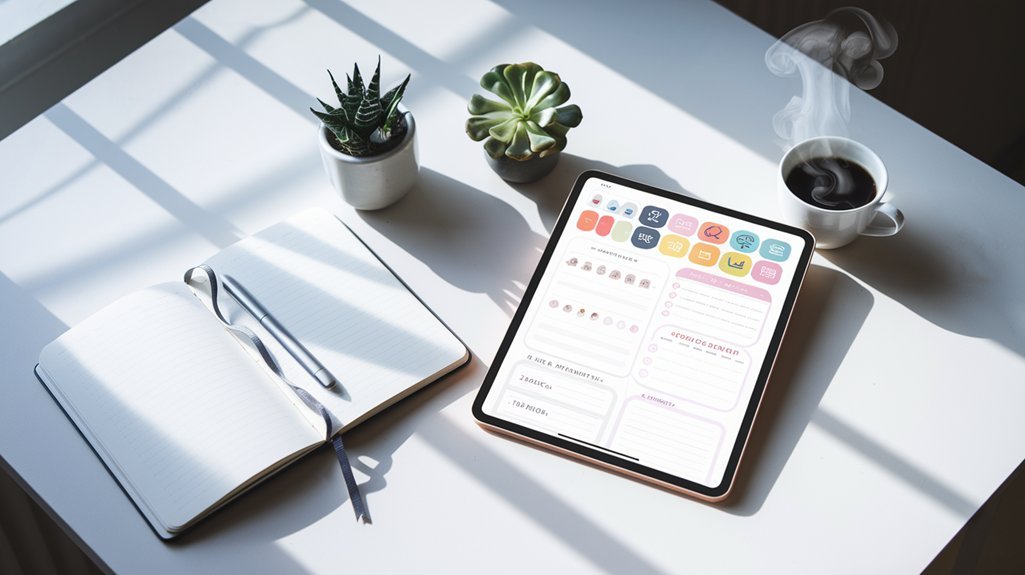
If you want the tactile satisfaction of pen-on-paper without committing to either camp, an iPad with a quality stylus and paper-texture software offers genuine middle ground. Apps like Notability and GoodNotes 5 pair realistic friction algorithms with pressure sensitivity that mimics actual writing. You get the organic feel of handwriting—the muscle memory, the spatial reasoning—combined with searchable text, infinite pages, and cloud backup. The setup runs $30 to $120 for software depending on your choice, plus whatever iPad investment you're already making. It's particularly strong if you sketch layouts often or travel with your journal. The downside: you're still tethered to a device, and battery dependency adds a small cognitive load that paper never carries. For people who've loved digital notes but craved that paper sensation, this hybrid usually clicks.
Time investment: 5 minutes weekly vs. switching ecosystems entirely
Paper notebooks demand a weekly maintenance ritual—reorganizing, flipping back to find scattered notes, rewriting incomplete entries. A digital bullet journal collapses that overhead. Most people spend 5 minutes weekly curating a digital system versus 30 minutes sorting through paper pages.
The real cost isn't time, though. It's switching ecosystems entirely. Moving from Notion to Apple Notes or from a physical Leuchtturm to a digital app means rebuilding your entire structure. You're retraining your muscle memory, losing the tactile feedback that made paper work, and starting from zero with a new platform's quirks. That migration period—typically two to three weeks of friction—erases the time savings you'd gain. Choose one system and commit deeply. That focus matters more than shaving minutes off your week.
Tools that bridge both worlds: Scansnap, Evernote Scan, Notion imports
The gap between analog and digital doesn't have to be a chasm. If you hand-write your bullet journal but want searchable digital backups, a document scanner like **ScanSnap** transforms pages into organized PDFs in seconds. Evernote's mobile scan feature works similarly—snap a photo of your page and it automatically handles the cleanup.
For those building a hybrid system, Notion's import tools let you photograph spreads and convert them into database entries. This means your physical journal remains tactile and intentional, while your digital vault stays current and indexed. The scanner route is particularly useful if you're a minimalist digitally but still crave pen-on-paper creativity. You get the best friction for thinking on paper and the frictionless search on screen.
Related Reading
Frequently Asked Questions
What is digital bullet journal vs paper notebook comparison?
Digital bullet journals offer searchability and sync across devices, while paper notebooks provide zero distractions and stronger memory retention. Studies show handwriting increases recall by up to 25% compared to typing. Choose digital for flexibility and portability, or paper if you need deep focus and tactile engagement with your planning system.
How does digital bullet journal vs paper notebook comparison work?
A digital bullet journal comparison weighs speed and searchability against the tactile, memory-boosting benefits of pen and paper. Digital tools like Notion let you access entries across 50+ devices instantly, while handwritten journals activate more brain regions during recall, making them ideal for retention and creative planning.
Why is digital bullet journal vs paper notebook comparison important?
Choosing between digital and paper bullet journals directly impacts your productivity system's success. Studies show 65% of users stick with their preferred format longer, making the right choice crucial for habit formation. Your decision affects daily friction, retention rates, and whether you actually maintain your system past the first month.
How to choose digital bullet journal vs paper notebook comparison?
Choose digital if you need searchability and sync across devices; choose paper if you value tactile feedback and zero distractions. Studies show handwriting improves retention by 25 percent, making paper ideal for memory work. Digital wins for quick access and backup security.
Is digital bullet journaling better for productivity than paper?
Digital productivity gains depend entirely on your work style. Studies show paper journalers retain 25% more information through handwriting. If you're distraction-prone, paper keeps you focused. If you need searchability and syncing across devices, digital wins. Test both for two weeks to find your match.
How much does a digital bullet journal app cost vs paper?
Digital apps range from free to $15 monthly, while paper bullets cost $10-30 upfront. Popular apps like Notability charge one-time fees, whereas paper requires only a notebook and pen. Your choice depends on whether you prefer ongoing subscriptions or a single investment.
Can you sync digital bullet journal across multiple devices?
Most digital bullet journal apps sync automatically across your devices using cloud storage. Apps like Notion, OneNote, and GoodNotes sync in real-time, so changes you make on your phone appear instantly on your tablet or computer. This seamless synchronization is one major advantage digital journals hold over paper—you're never working with outdated information.