- Why Minimalist Wins When You're Short on Time
- Your Minimalist Supply Kit
- Monthly Spread Layouts (3 Ways)
- Weekly Spread Layouts (3 Ways)
- Daily and Task Layouts (2 Ways)
- Habit and Goal Trackers (2 Ways)
- Quick-Reference Spreads (2 Bonus Layouts)
- Time Estimates at a Glance
- Customizing These Layouts for Your Work Style
- How long should a minimalist bullet journal spread actually take to set up?
- Do I need a dot-grid notebook, or will lined paper work?
- What if I miss a few days and my tracker looks incomplete?
- Related Posts
Disclosure: This post contains affiliate links. If you click through and make a purchase, we may earn a small commission at no extra cost to you. Thank you for supporting this site!
Twelve minutes. That's the average time I've clocked setting up a full weekly spread once I stripped my bullet journal down to the essentials — down from the 45-minute watercolor-and-washi marathons I used to attempt before an 8 a.m. meeting. If you're a working professional who loves the idea of bullet journaling but doesn't have a lunch break to dedicate to hand-lettering, this roundup is for you. I've filled more than 20 journals since 2016, and the layouts that actually survived my busiest quarters were never the Pinterest-famous ones — they were the ones I could rebuild from memory in under ten minutes. Below are 12 of them, with exact measurements, the pens I reach for, and honest notes on what didn't work before I landed on what did.
Why Minimalist Wins When You're Short on Time
A 2023 survey by the Bullet Journal Method's own community forum (bulletjournal.com) found that “consistency” was cited by over 60% of long-term users as the reason they stuck with the system — not artistic skill. That tracks with what I've seen in my own journaling group: the members who ditched their journals within three months were almost always the ones attempting elaborate spreads with six colors and hand-drawn banners every single week. Minimalist layouts remove the friction. When setup takes 8 minutes instead of 40, you actually open the notebook on a Tuesday morning before your first Zoom call.
It looked gorgeous. It also took me 55 minutes per spread, and by week three of each month I resented my own journal. That's the trap — treating your planner like a scrapbook project instead of a working tool. The layouts in this article use grids, dots, and simple boxes instead of illustrations, which means you can rebuild any of them on a blank Leuchtturm1917 page (5mm dot spacing) using nothing but a ruler and a fine-tip pen.
Your Minimalist Supply Kit
You genuinely don't need more than three tools for every layout in this article. My daily kit is a Sakura Pigma Micron 05 (about $2.75 individually, or $8.49 for a pack of three at most craft stores) for grid lines and text, a Tombow Dual Brush Pen in N15 (black) for headers, and a single accent color — usually Tombow 373 (Sea Blue) — for highlighting deadlines. That's it. The full 10-pen Tombow Dual Brush set runs about $17.99 on Amazon as of 2024, but you only need one or two colors for anything in this roundup.
For the notebook itself, I use a Leuchtturm1917 A5 dotted edition ($21.95 at leuchtturm1917.com), because the 5mm dot grid makes it easy to eyeball a 3cm box without measuring every single time. If that price feels steep, a Decomposition Book ($9.95, dot-grid version) or a plain Muji A5 notebook ($3.50) works just as well for grid-based layouts — the paper is thinner and won't handle heavy brush pens, but for Micron-only spreads it holds up fine. Budget tip: a 12-pack of Paper Mate Flair felt tips ($9.99) is a solid stand-in for Tombow if you're testing the habit before investing.
Monthly Spread Layouts (3 Ways)
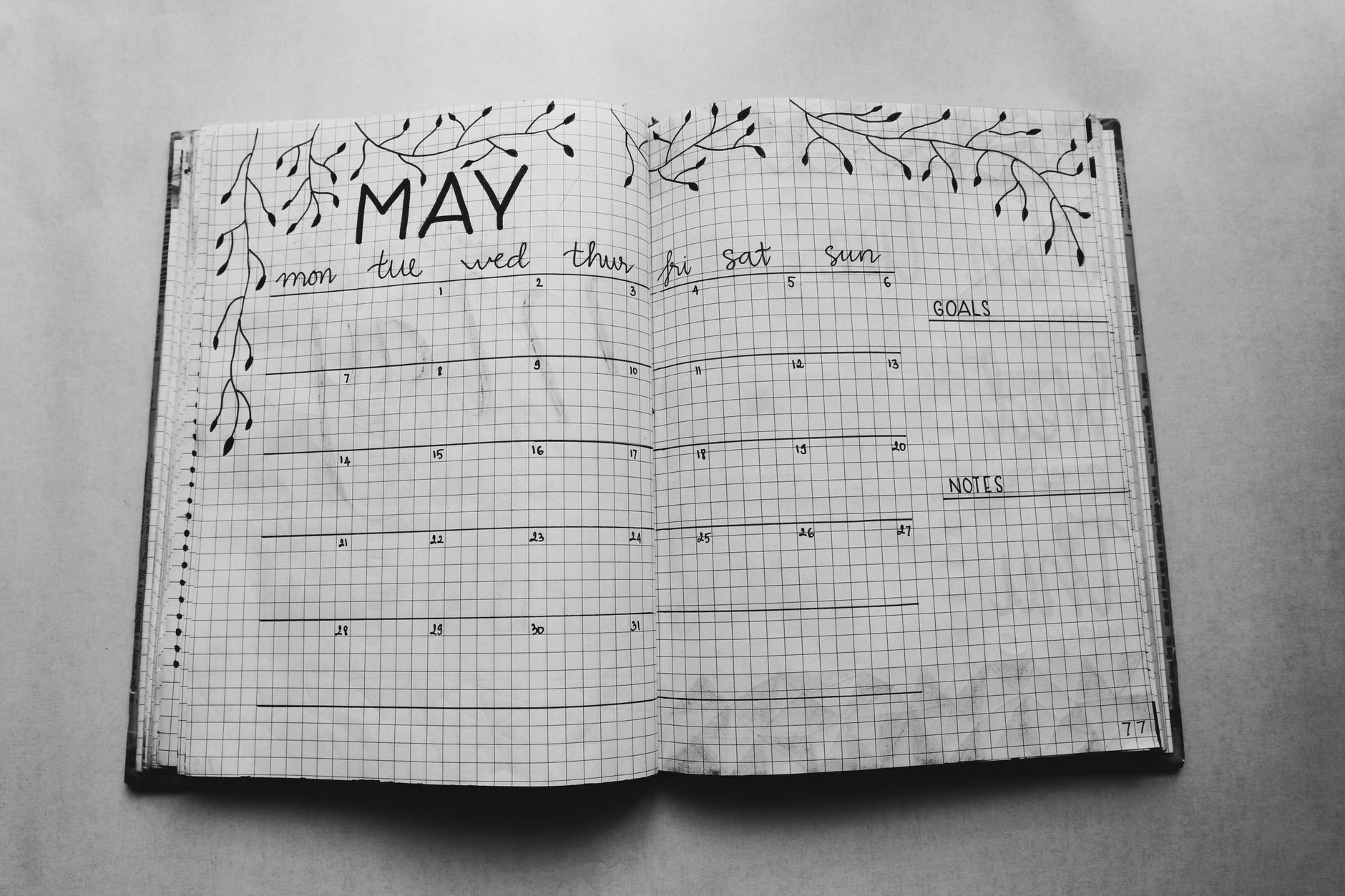
Layout 1 — The Single-Column List (4 minutes). Skip the calendar grid entirely. Write the month name at the top in a 2cm-tall header, then list every date down the left margin in a single column, one line per day, each line about 0.6cm apart if you're using 5mm dot paper. Leave the right two-thirds of the page blank for notes. I use this during my busiest work months — October and January in my industry — because there's nothing to erase if a date's info runs long.
Layout 2 — The 4×8 Grid (8 minutes). Draw a grid of 4 columns and 8 rows using a ruler, each box roughly 4cm wide by 2.5cm tall on an A5 page. This fits a 30 or 31-day month with two boxes left as a mini key. I write appointments in Micron 05 and circle deadlines in Tombow 373. This is the layout I use for client-facing months because it gives a full visual overview in one glance during a status meeting.
Layout 3 — The Task-Migration Monthly (6 minutes). This is straight from Ryder Carroll's original Bullet Journal Method (bulletjournal.com), and it's still the fastest one I own. List dates down the left in a narrow 1cm column, then a single line of dashes for tasks and dots for events, migrating anything unfinished at month's end using the “>” symbol. No grid lines needed at all — just a ruler for the date column and you're done.
Weekly Spread Layouts (3 Ways)
Layout 4 — The Box Method (7 minutes). Divide a two-page spread into 7 equal boxes, each about 5cm x 8cm on A5 paper (roughly one box per weekday, with weekend boxes combined into one). I draw these with a ruler in under two minutes, then fill each box with three to five bullet points max. Capping each box at five lines forces you to prioritize instead of dumping your entire to-do list onto Monday.
Layout 5 — The Priority Column (5 minutes). Split the page into two columns — a narrow 3cm “Top 3” column on the left for must-do items, and a wider column on the right for the rest of your week's tasks. This one saved me during a product launch in 2023 when my weekly lists had ballooned to 25+ items and I couldn't tell what actually mattered. Capping the left column at exactly three items is non-negotiable — that's the whole point.
Layout 6 — The Time-Blocked Strip (9 minutes). For each day, draw a narrow horizontal strip divided into three sections — morning, afternoon, evening — each about 6cm wide. This works best if your job runs on meetings rather than open-ended tasks. I tried hourly time blocks (a full 12-hour breakdown per day) once and abandoned it within a week because redrawing 12 tiny boxes per day, seven days a week, ate close to 25 minutes total. Three big blocks per day solves the same problem in under a third of the time.
Daily and Task Layouts (2 Ways)
Layout 7 — The Three-Task Rule (2 minutes). Underneath the day's date, draw three short lines, about 4cm each, and nothing else. You're limited to three tasks. This sounds almost too simple, but according to productivity researcher and author Cal Newport's writing on “deep work,” most professionals overestimate how many substantial tasks they can realistically complete in a single day — three is a more honest number than the ten most planners try to cram in.
Layout 8 — The Rapid Log (3 minutes). This is the original Bullet Journal daily format: a bullet (•) for tasks, a dash (–) for notes, and an open circle (○) for events, all in a single running list with no boxes or grids at all. It's the fastest layout in this entire article because there's genuinely nothing to draw. I use this on days when I know my schedule's going to be chaotic and I won't have time to even glance at a pre-drawn structure.
Habit and Goal Trackers (2 Ways)
Layout 9 — The Minimalist Habit Grid (6 minutes). Draw a grid with your habits listed down the left (aim for no more than 5 — tracking 12 habits sounds ambitious but research on habit formation, including James Clear's “Atomic Habits,” repeatedly notes that stacking too many new habits at once reduces follow-through) and dates across the top, boxes about 0.8cm square. Fill each box with a simple dot or X in Micron 05. I've tracked water intake, a 20-minute walk, and reading time this way for the past 14 months, and the grid takes under 6 minutes to rule up each month.
Layout 10 — The Monthly Progress Bar (4 minutes). Instead of a grid, draw a single horizontal bar, 15cm long, divided into 30 or 31 equal segments (roughly 0.5cm each). Color in one segment per day you complete a single specific goal — say, a no-spend day or a strength-training session. It's visually satisfying without needing daily upkeep of a whole grid, and it's the layout I recommend most to people who say habit trackers usually make them feel guilty by month's end.
Quick-Reference Spreads (2 Bonus Layouts)
Layout 11 — The Contact and Meeting Log (5 minutes). One page, divided into two columns: names and numbers on the left (3cm wide), meeting notes with dates on the right. I keep this at the back of my notebook and flip to it instead of digging through Slack threads for a phone number I wrote down three weeks ago.
Layout 12 — The Weekly Review Checklist (3 minutes). A short list of five yes/no prompts — “Inbox at zero?”, “Top 3 tasks done?”, “Anything to migrate?” — written once as a template on a sticky-note-sized area, about 8cm x 6cm, that you can reuse every single week without redrawing it. This is the layout that actually keeps the other eleven honest, because a five-minute Friday review is what catches a habit tracker you forgot to fill in on Wednesday.
Time Estimates at a Glance
- Fastest setup: Layout 8 (Rapid Log) — 3 minutes
- Slowest setup: Layout 6 (Time-Blocked Strip) — 9 minutes
- Average across all 12 layouts: roughly 5.5 minutes
- Total time to set up an entire month using one monthly, one weekly repeated 4x, and one habit tracker: approximately 45 minutes for the whole month
Compare that to the elaborate spreads circulating on Pinterest and Instagram, which independent time-lapse videos from creators like Amanda Rach Lee often clock at 60-90 minutes per single weekly spread. Over a month, that's the difference between roughly 45 minutes total and 4-6 hours. For most working professionals, that math makes the decision for you.
Customizing These Layouts for Your Work Style
If you work in a client-facing role, lean toward Layout 2 (the 4×8 monthly grid) and Layout 4 (the Box Method weekly) because they give you something to glance at mid-meeting without flipping pages. If you're in a deep-focus role like writing, design, or development, Layout 5 (Priority Column) and Layout 7 (Three-Task Rule) protect your attention better because they physically limit how much you can commit to in a day.
Parents balancing a full-time job with family logistics might find our sister site's approach useful too — Family Flourish has a full guide to shared family calendars that pairs well with a minimalist weekly spread, since you can keep personal tasks in your bullet journal and household logistics in a separate shared system without duplicating effort. And if you're rotating between a physical Leuchtturm1917 and a digital app like GoodNotes or Notion during a busy week, stick to the same symbol system — bullet, dash, circle — across both so your brain doesn't have to relearn the shorthand every time you switch formats.
Start small: pick one monthly layout and one weekly layout from this list, grab a Micron 05 and a single Tombow accent color, and give yourself exactly one month before deciding what to keep. Track how long setup actually takes you with a phone timer — most people are surprised it's closer to 6 minutes than the 20 they'd guessed. If a layout still feels like a chore after two weeks, swap it for another one on this list rather than assuming bullet journaling isn't for you; the format is the variable, not your discipline. My honest recommendation for someone starting today is Layout 8 paired with Layout 9 — the Rapid Log and the Minimalist Habit Grid together take under 10 minutes and cover almost everything a busy week throws at you.
How long should a minimalist bullet journal spread actually take to set up?
Based on the 12 layouts here, most take between 2 and 9 minutes, with an average around 5.5 minutes. If a layout is regularly taking you 20 minutes or more, it's not minimalist anymore, regardless of how simple it looks in a photo. Time yourself once with your phone's stopwatch — it's the fastest way to catch a layout that's quietly eating more of your morning than it should.
Do I need a dot-grid notebook, or will lined paper work?
Dot-grid paper, like the 5mm spacing in a Leuchtturm1917 or Rhodia Goalbook, makes ruling boxes and columns noticeably faster because the dots act as built-in guides. Lined paper works fine for list-based layouts like the Rapid Log or Single-Column monthly, but grid-based spreads like the 4×8 Monthly or Habit Grid will look uneven without dot guides. If budget's a concern, a plain notebook with a printable dot-grid overlay taped underneath the page works as a temporary fix.
What if I miss a few days and my tracker looks incomplete?
Related Posts



Your Weekly Dose of Inspiration
Journaling ideas, family tips, and gentle inspiration.
Love this content?
Join the BulletJournals.net community for exclusive tips, guides, and updates.
Subscribe Free